
A D80 code on an LG dryer means the Flow Sense system has detected that the exhaust duct is about 80% clogged. LG’s own error-code list describes d80 as a duct restriction level, and on gas models it can also point to a lack of gas supplied to the unit. In most homes the cause is lint in the filter, the hose behind the dryer, or the vent that runs outside. If you have checked those and the code keeps returning, our technicians handle LG dryer repair across Orange County and Los Angeles County.
TL;DR
- D80 is a warning that airflow is restricted by roughly 80%. D90 and D95 mean 90% and 95%, and those two mean stop using the dryer.
- Start with the lint filter, then the hose behind the dryer, then the outside vent hood. Unplug the dryer before touching the duct.
- After the vent is cleared, the indicator may need several cycles to reset. If it stays active beyond five cycles, the dryer needs service.
- A dryer that will not turn on, will not tumble or dries slowly has its own short checklist below.
- Repeated codes, long vent runs with many bends and anything inside the cabinet are jobs for a licensed technician.
Table of Contents
- What the D80 code actually means
- D80 versus D90 and D95: how urgent is it?
- Safe inspection order for a D80 code
- When the vent layout is the problem
- A note for gas dryers
- Resetting the dryer and confirming the code is gone
- Other dryer problems that show up with a blocked vent
- Why a technician beats another round of guessing
- Our approach to LG dryer repair
- Our perspective
- FAQ
- Sources
What the D80 code actually means
LG dryers carry a system called Flow Sense that watches how freely air leaves the machine. When the exhaust path narrows, the dryer reports it as a percentage. According to LG USA, the d75, d80, d90 and d95 codes correspond to a duct that is clogged at 75%, 80%, 90% or 95%. Two or four bars on the Flow Sense indicator mean the exhaust system is severely restricted.
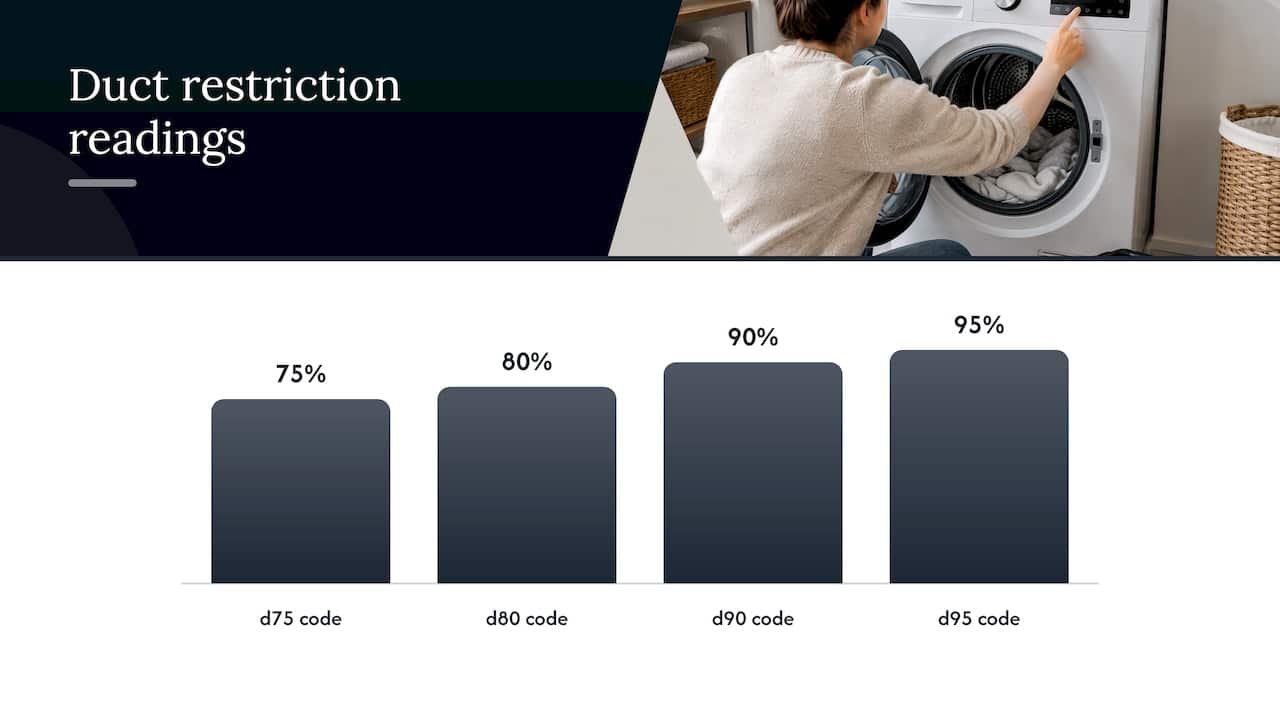
In plain terms, the dryer is telling you that hot, moist air is not leaving fast enough. Lint is the usual reason, but a crushed hose, a vent run that is too long, or a stuck flap on the outside wall will produce the same warning.
How the dryer knows
The dryer does not measure airflow directly. According to iFixit’s troubleshooting guide, the control board watches how quickly the high-limit thermostat opens after the heater switches on. The more blocked the vent, the faster the thermostat trips. That has a side effect that surprises people: a badly blocked dryer can feel cooler inside than a healthy one, because the heat keeps cutting out.
The same guide notes that a faulty high-limit thermostat can open at a lower temperature than designed and trigger a duct-obstruction code even when the vent is clear. That is one reason a code that survives a thorough vent cleaning deserves a technician rather than another round of guessing.
D80 versus D90 and D95: how urgent is it?
The numbers matter because they change what you should do tonight.
| Code | Approximate restriction | What to do |
|---|---|---|
| d80 | About 80% | Warning. Check and clean the vent soon. |
| d90 | About 90% | Stop using the dryer until the exhaust is cleaned and repaired. |
| d95 | About 95% | Stop using the dryer until the exhaust is cleaned and repaired. |
LG USA states that using a dryer with a severely restricted exhaust may create an unsafe environment, and says not to use it until the exhaust system has been cleaned and repaired. LG’s Canadian Flow Sense page gives the same instruction for a d95 warning. LG’s troubleshooting table adds that the d80, d90 and d95 display lasts two hours, and that a severely restricted exhaust could result in fire or property damage.
iFixit reports that a d80 appears after the cycle completes as an early warning, while at d90 or above the dryer shuts itself down. Either way, treat D80 as the cheapest moment to fix the problem, because the vent only gets more blocked from here.
Safe inspection order for a D80 code
LG’s own guidance sets an order that goes from easiest to hardest. Follow it in sequence. The LG owner’s manual says the dryer must be disconnected from the power supply before cleaning or user maintenance, and that turning the controls to OFF does not disconnect it. Pull the plug, or for a gas model shut the gas valve and unplug as well.
Step 1: clean the lint filter
Roll the lint off the screen. If the screen looks coated or shiny, wash it with soap and water and let it dry completely before putting it back, as LG’s Flow Sense page describes. A film from dryer sheets can block air even when no lint is visible.
Where it goes wrong: a damp screen put back in the dryer, or a filter that looks clean but is coated. Many people stop at this step and the code returns within days.
Step 2: check the hose behind the dryer
With the dryer unplugged, slide it out carefully. LG’s error-code guidance says to confirm the exhaust hose is not crushed, dented, kinked or compressed, is not coiled like a spring, and has no holes or loose connections.
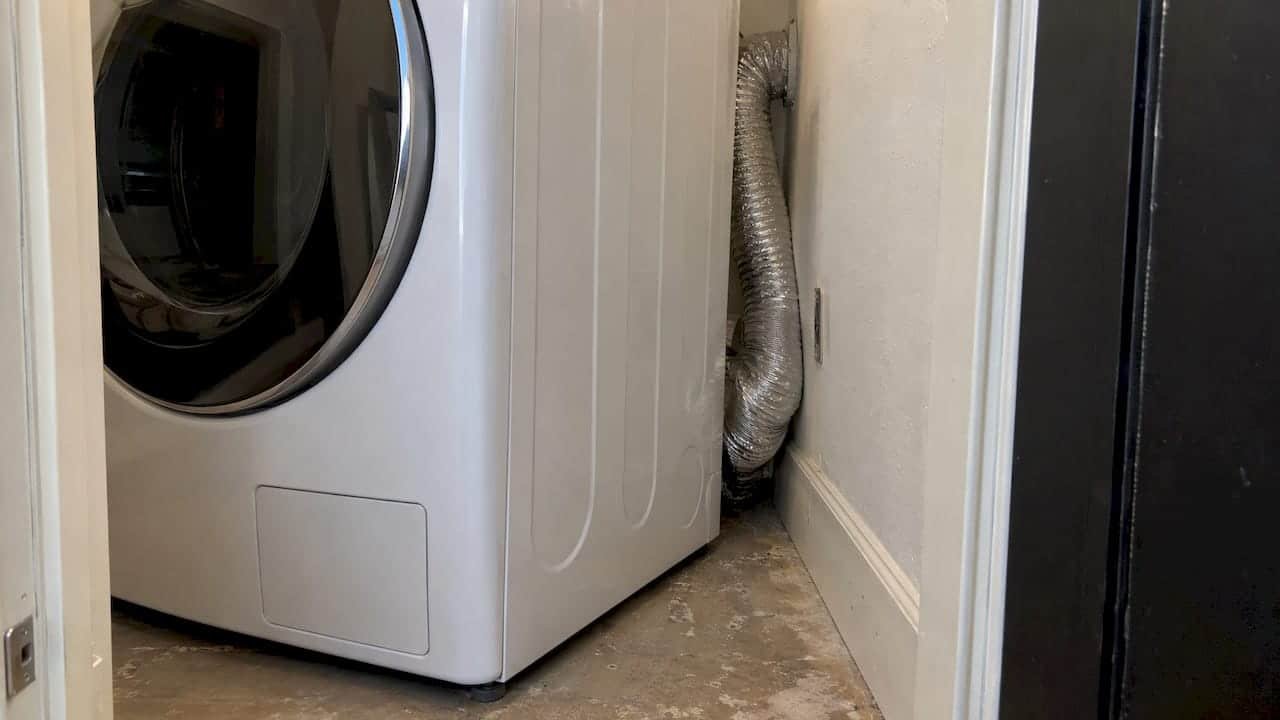
Where it goes wrong: the hose is often crushed the day the dryer was pushed back against the wall. Moving the dryer also strains gas connections, so on a gas dryer move it gently and do not pull on the gas line.
Step 3: look at the outside vent hood
Go outside and look at the vent cap. The flap should open freely and fully. LG says you can verify the flappers by running the Air Dry cycle and watching them open. The Building America Solution Center at Pacific Northwest National Laboratory advises that the vent cap should not have a screen over it, because a screen traps lint and blocks airflow. iFixit makes the same point and adds that a damper flap is required while mesh is not.
Where it goes wrong: bird nests, packed lint behind the flap, or a screen that a previous owner added to keep pests out.
Step 4: clear the duct
The same Solution Center guide recommends cleaning the duct from both ends, using either a leaf blower on its lowest setting or a rotating dryer-vent brush with a shop vacuum. This is where most do-it-yourself attempts stall. Ducts are long, they run through walls and ceilings, and the lint that matters is usually in the middle where you cannot reach.
LG says that if the ductwork is too long or has too many bends, you should call a professional. The same guidance suggests asking the person who cleans the duct to report the vent length and the number of 90-degree angles. Those two numbers tell you whether the vent layout is the real cause. Our dryer vent cleaning guide explains why this matters for safety, and our page on dryer vent repair covers damaged or poorly routed runs.
Step 5: test the airflow
Plug the dryer back in, run a drying cycle, and go outside. You should feel strong airflow at the hood. LG’s instruction for the d90 and d95 codes is to check the outside vent while the dryer is operating, so this is the proof that the path is open.
When the vent layout is the problem
Sometimes there is nothing to clean. A long run with several elbows can restrict airflow from the day it is installed. A reader on a popular appliance forum described exactly this: nothing was kinked, but the line was long and had three elbows to reach the outside. LG’s guidance is to compare your duct length and bend count with the owner’s manual.
This also explains a common situation after a replacement. LG notes that a newly installed dryer may detect a restriction in an existing vent even if the old dryer showed no warning. The previous machine’s lint is still in the duct. If you have just had a new dryer installed and see D80 in the first weeks, have the duct cleaned and the run checked. Our appliance installation team can look at the vent connection as part of a setup.
A note for gas dryers
LG’s list states that on gas dryers a d80 code may instead indicate a lack of gas supplied to the unit. Before you assume lint, confirm that both the house gas shutoff and the dryer’s own gas shutoff valve are fully open. LG’s manual also warns that if gas is not supplied the dryer will still run and no error codes will display, so a dryer that tumbles without heating is a separate symptom worth noting.
Gas work is not a casual home project. If a valve is closed and opening it does not solve the problem, or you smell gas, leave the area and call your gas utility. For a dryer that will not heat on a gas supply, our gas appliance repairs and our guide to why a dryer is not heating are the next stops. Venting rules for gas dryers are covered in our gas dryer venting code article.
Resetting the dryer and confirming the code is gone
Cleaning the vent does not always clear the display immediately. LG’s manual says the Flow Sense system needs multiple consecutive cycles to confirm improved airflow before the indicator resets. If the indicator remains active for more than five cycles after the restriction is cleared, LG says to call for service.
iFixit describes a manual reset for LG error codes:
- Press the power key to turn the dryer off.
- Unplug the dryer or switch off its circuit breaker.
- Press and hold the start key for 5 seconds.
- Restore power.
If the code reappears, the dryer may need to complete a full cycle with no clog detected before it clears. A reset only clears the message. It does not fix a blocked duct, so run the airflow test in step 5 before you decide the job is done.
Other dryer problems that show up with a blocked vent
Several symptoms people search for alongside D80 share the same root cause, and several do not.
Dryer not drying well or taking too long
LG’s troubleshooting table lists blocked or dirty exhaust ducts, a duct run that is too long, and outside wall dampers that do not open properly as causes. Two non-vent causes are worth checking first:
- Mixed loads. Light items mixed with heavy ones can fool the moisture sensor, because the light items dry faster.
- Energy Saver mode. LG’s support page says a new electric dryer may simply have Energy Saver on, which is the default in the Normal cycle. Turn it off for a faster cycle that begins with heated drying.
Very small loads can also prevent the control from sensing dryness on Sensor Dry cycles, causing early shutoff. Add a few items or use Time Dry. If you have done all of this and the vent is clear, the heating system is the next suspect. Our LG dryer repair near me page explains how to book a visit.
Dryer not turning on
LG’s table for a dryer that will not turn on gives two checks. Make sure the plug is firmly seated in a grounded outlet that matches the rating plate. Then reset the tripped circuit breaker or replace the blown fuse, and never increase the fuse capacity. If the cause is a circuit overload, LG says to have it corrected by a qualified electrician. A breaker that trips again right away is a signal to stop and call a professional.
Drum not turning or not tumbling
This one is different. If the dryer powers on, but the drum does not rotate, airflow is not the issue and the vent is not the fix. The cause is mechanical and sits inside the cabinet, often a worn drive part. LG’s owner’s manual says all repairs and servicing must be performed by qualified service personnel unless the manual specifically recommends otherwise. Do not open the cabinet to look. A technician can diagnose which part has failed and quote the repair before work begins.
Why a technician beats another round of guessing
The do-it-yourself checks above are worth doing once. They are also the point where the problem tends to get stuck, for three reasons.
- The blockage is out of reach. The lint that sets off D80 often sits in the middle of a long run behind a wall.
- Two problems look like one. A clear vent with a persistent code can mean a faulty high-limit thermostat, a gas supply issue or a sensing fault, none of which a brush will fix.
- The risk is real. LG itself describes a severely restricted exhaust as a fire and property damage hazard, and its own guidance is that the interior and exhaust duct should be cleaned periodically by qualified service personnel.
When you book a visit, give the technician the code, how long it has been showing, whether the dryer is gas or electric, and whether a new dryer was recently installed. Write down the vent length and the number of 90-degree bends if you can find them. That shortens the diagnosis.
Our approach to LG dryer repair
MDTech Services provides residential appliance repair and installation in Orange County and Los Angeles County, including LG dryers. Our technicians are licensed, and we cover major household brands, including some that other providers decline. You can book online, and we offer 24/7 emergency availability. We also work on gas appliances, so a dryer that shows D80 on a gas supply is handled by the same team that checks the vent.
If your dryer is showing D80 or D90 and you want it diagnosed, see our appliance repair services page and pick a time that suits you.

Landlords and property managers can use the same booking route for rental units, as long as the owner or manager authorizes the work.
Our perspective
A D80 code is the cheapest warning a dryer will ever give you. It appears while the dryer still runs and before the exhaust is blocked enough to shut the machine down.
In our work on LG dryers, we treat the code as a question about the whole exhaust path, not only the machine. We look at the filter, the hose, the duct run and the outside hood together, because a clean filter with a crushed hose still triggers the same warning.
We also want the repair to last. Our approach is to correct the cause so the dryer is safe to run again, with upfront pricing and long-term, warranty-safe solutions as our aim. That is why we would rather diagnose a recurring D80 properly than reset it and leave you waiting for D90.
If your dryer is gas, we check the gas supply as part of the same visit, since LG lists it as a possible cause of d80 on those models.
MDTECH
FAQ
Can I keep using my LG dryer with a D80 code?
D80 is a warning of about 80% restriction, and the dryer may still run. You should clean the vent soon rather than keep running it, because the restriction tends to worsen. At D90 or D95, LG says not to use the dryer until the exhaust is cleaned and repaired.
How do I clear the D80 code?
Clear the actual restriction first: filter, hose, duct and outside hood. Then run drying cycles. LG says the indicator can need several consecutive cycles to reset, and that you should call for service if it stays active for more than five cycles after cleaning.
Is the D90 code the same problem as D80?
Yes, the cause is the same, an exhaust restriction, but the level is higher. D90 means about 90% and D95 about 95%. The fix is the same, but the urgency is greater, since LG says not to run the dryer at those levels.
Why does my new LG dryer show D80?
A new dryer can detect a restriction that the old one never reported, because lint from the previous machine is still in the household duct. LG recommends having the duct cleaned and comparing its length and number of bends with the owner’s manual.
Why will my dryer not tumble even though it has power?
A drum that does not turn points to a mechanical fault inside the cabinet, not a vent problem. LG’s manual states that servicing must be done by qualified personnel, so schedule a diagnosis rather than opening the cabinet yourself.
Sources
- LG Dryer – Error Code List | LG USA Support
- LG Dryer – Error Code List (New) | LG USA Support
- LG Dryer – Understanding d90 and d95 Error Codes | LG USA
- Flow Sense WARNING: d80 / d90 / d95 message | LG Canada
- Not heating / Not drying / Thumping noise / Burnt smell | LG Canada
- LG dryer troubleshooting table (manual)
- LG dryer troubleshooting table, gas models (manual)
- LG owner’s manual, WKEX200H / WKGX201H series
- Clean Dryer Exhaust | Building America Solution Center
- LG Dryer D80 Code | iFixit Troubleshooting