
A blank thermostat screen almost always means the thermostat has lost power. On a battery-powered model, the cause is often dead batteries. On a wired model, the cause is usually a tripped breaker, a switch or panel at the furnace or air handler, a blown low-voltage fuse, or a wiring fault. You can safely check the batteries, the breaker, the service switch and the equipment panel yourself. Anything involving wires or fuses inside the equipment belongs to a licensed technician.
This guide walks you through the checks in the order we recommend, explains what each result tells you, and shows when to stop. It also covers “waiting” messages that look like a failure, smart thermostat power needs, and what a repair visit involves.
TL;DR
- A blank display means the thermostat is not getting usable power. Trane describes it as a loss of thermostat power, either from batteries or from the wired system.
- Start with fresh batteries (if your model takes them), then the HVAC breaker, the equipment service switch, and the furnace or air-handler panel.
- Do not touch wiring, fuses or control boards unless you are trained. Call a professional for frayed wires, burning smells or a screen that stays blank.
- A smart thermostat that goes dark often needs a common wire (C-wire) for steady power.
- In Orange County and Los Angeles County, we can diagnose and repair the thermostat, the wiring or the HVAC equipment behind it.
Table of Contents
- First, find out how your thermostat is powered
- The checks to make, in order
- What the cause usually is, and who fixes it
- Why a wired or smart thermostat goes blank
- Blank screen or just waiting?
- “Not communicating” and “no signal” messages
- Stop and call a professional if you see any of these
- Smart thermostat compatibility: what to confirm before you upgrade
- Get a blank thermostat fixed by a local technician
- FAQ
- Sources
First, find out how your thermostat is powered
Everything else depends on this. Take the thermostat cover off or look at the back of the faceplate and check for a battery compartment.
- Battery-powered only: The batteries are the first suspect. Many basic digital models work this way.
- Wired with battery backup: The thermostat draws power from the HVAC system and uses batteries as a backup or to help it run. A blank screen can point to either source.
- Hardwired with no batteries: Many smart thermostats work this way. A blank screen means the 24-volt low-voltage supply from the furnace or air handler is not reaching the thermostat.
If you are not sure, check the model number on the back of the faceplate or in the settings menu, then look it up in the manual.
The checks to make, in order
Work through these from simplest to most involved. Stop as soon as the screen comes back, and stop immediately if you see anything that worries you.
1. Touch the screen and check the basics
Some displays go dark to save energy. Amazon’s support guidance for its smart thermostat says to wake a dim, inactive display by touching it before you check anything else. Press a button or tap the screen, then confirm the display brightness setting if your thermostat has an app.
2. Replace the batteries
If your thermostat takes batteries, replace them with fresh ones of the type printed in the compartment. Trane advises fresh batteries for battery-powered models when the display goes fully blank. Do not mix old and new cells, and check that they sit firmly against the contacts.
On some Honeywell models, batteries also help you sort out the problem. For the TH6210U2001, TH6220U2000 and TH6320U2008, Honeywell’s support page explains that on common-wired models, new batteries can help you tell a thermostat problem from lost HVAC power. If battery power brings the display back, the next step is to check the breaker, the furnace power switch and the furnace-door switch. If it stays blank, a technician should look at it.
3. Check the HVAC breaker
Go to your electrical panel and look for the breaker labeled for the furnace, air handler or air conditioner. A tripped breaker sits in the middle or off position. American Standard lists a tripped breaker among the common causes of a blank display, alongside dead batteries and a blown fuse.
Flip a tripped breaker fully off, then back on once. If it trips again right away, leave it off and call us. A repeat trip means something in the system is drawing too much current, and resetting it again can make the problem worse.
4. Check the service switch and the access panel
Most furnaces and air handlers have a switch that looks like an ordinary light switch, often on or near the unit. It is easy to flip off by accident while someone is working in a closet, attic or garage.
The unit’s front panel matters too. Honeywell’s T10 documentation points to the breaker, the heating and cooling power switch, a securely closed furnace door and the C-wire connection as things to check when the display is blank. A panel that is not fully seated can open a safety switch and cut the low-voltage power to the thermostat, even though the thermostat itself is fine.
Turn the unit’s switch off before you remove or replace any panel. Press the panel firmly into place, and then restore power.
5. Look at the filter and the condensate drain
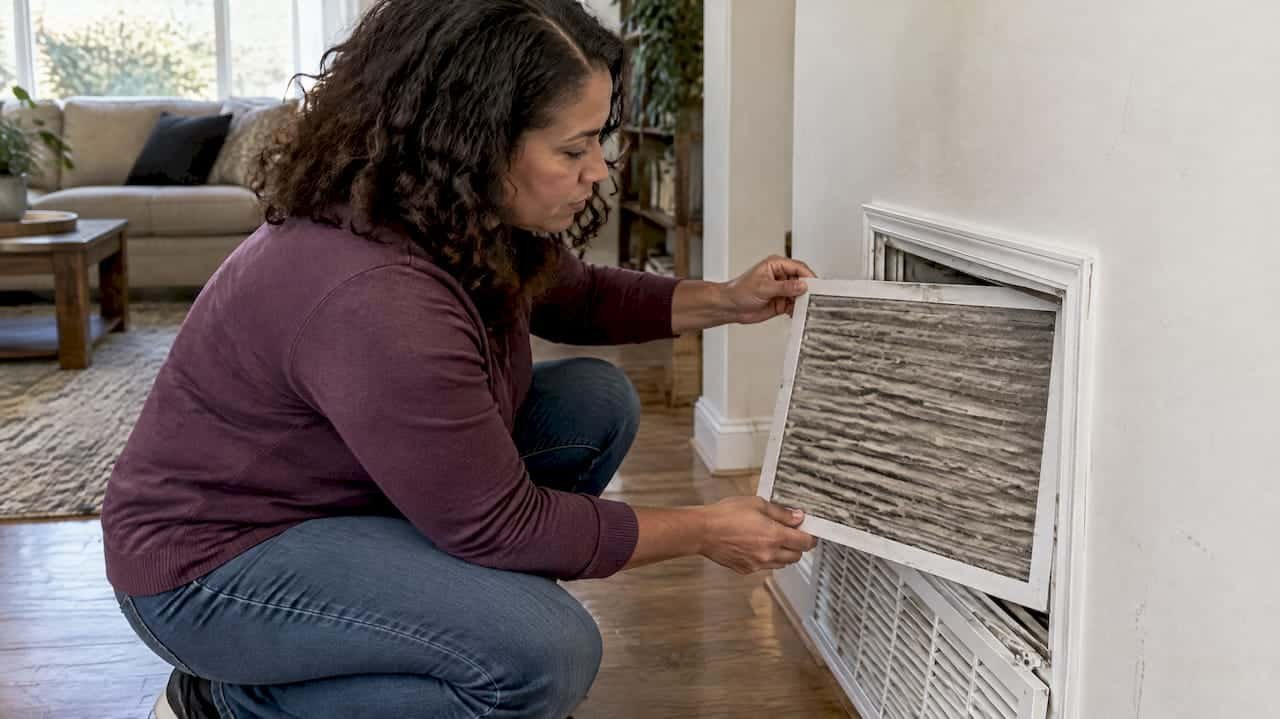
A badly clogged filter can cause equipment safety shutdowns. Carrier notes that a heavily clogged filter may trigger a shutdown, and that a restricted-airflow shutdown can make the thermostat look dead when it is not. If your filter is visibly packed with dust, replace it. Our guide to the furnace short cycling checks covers other airflow-related signs.
Air conditioners also have a float switch in the condensate drain line that shuts the system down when water backs up. If you see water around the indoor unit, turn the system off and call for service rather than clearing it while the unit is live.
6. Power cycle the system
A short reset clears many glitches. Trane’s guidance is to wait until the heating or cooling cycle ends, turn the thermostat circuit off for 20 to 30 seconds, then restore power. If the screen is still blank, contact an HVAC professional. Carrier suggests powering the HVAC system off for 60 seconds after a power irregularity such as an outage or surge.
7. Check that the thermostat is seated on its wall plate
Many thermostats snap off the wall plate. If it was bumped or cleaned, it may no longer make contact. Press the faceplate firmly back into position. Do not pull on wires, and do not remove them from the terminals.
What the cause usually is, and who fixes it
The table below pairs each likely cause with what you can do and what needs a professional. It is a guide to sequence, not a ranking of how often each occurs in your home.
| Likely cause | What you can do | When to call us |
|---|---|---|
| Dead or weak batteries | Replace them with fresh ones | Screen stays blank after new batteries |
| Tripped breaker | Reset once at the panel | Breaker trips again |
| Service switch off | Turn it on | Switch is on but the unit has no power |
| Panel not seated | Turn off the unit, reseat the panel | Panel is damaged or the switch will not engage |
| Blown low-voltage fuse | Nothing: the fuse sits on the control board | Always |
| Loose, damaged or missing C-wire | Nothing beyond looking at the faceplate | Always |
| Condensate float switch shutdown | Turn the system off and note any water | Always |
| Failed thermostat or control board | Nothing | Always |
A fuse on the furnace control board is a small, inexpensive part, but replacing it means opening the equipment. Amazon’s support page mentions 3-amp or 5-amp furnace-board fuses among the things to check, which is a sign of how often a low-voltage fuse is involved. A blown fuse also has a reason behind it, usually a short in the thermostat wiring or a fault in a connected part. Replacing the fuse without finding the short often means it blows again.
Why a wired or smart thermostat goes blank
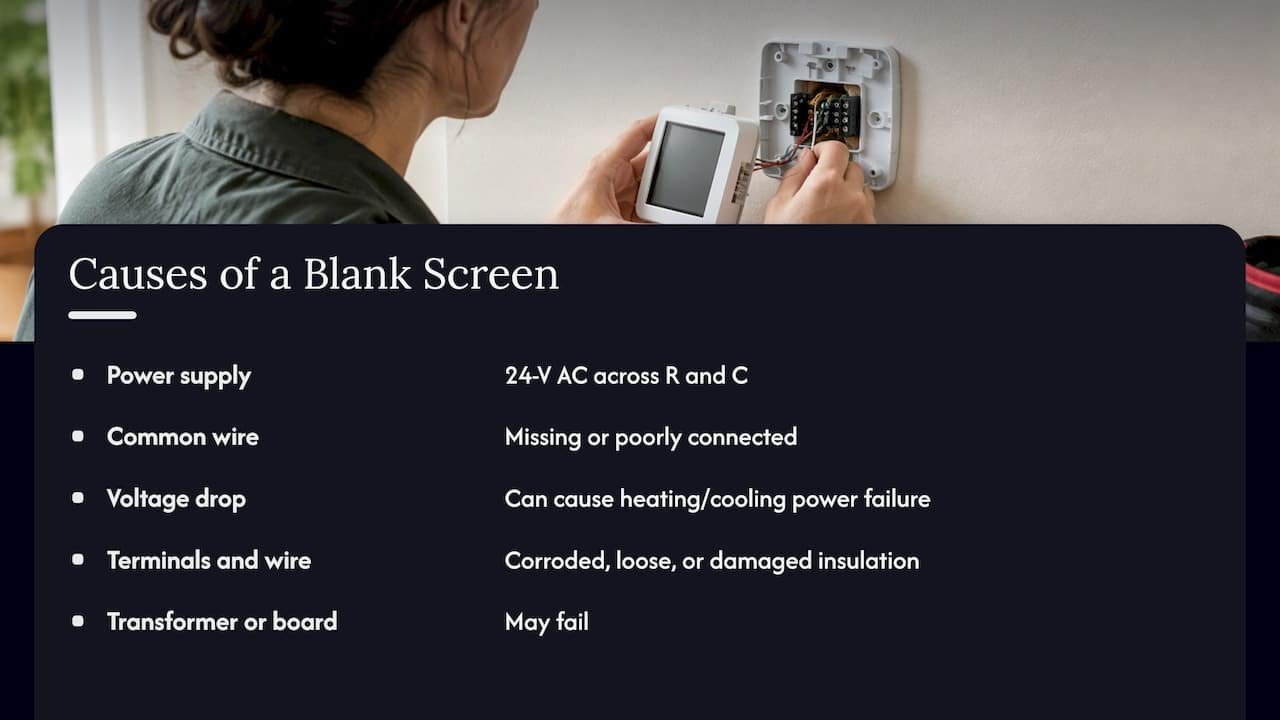
Thermostats that run only on the HVAC system’s power need a steady 24-volt supply. Venstar states that its directly powered thermostat should see 24-V AC across the R and C terminals. If that supply drops or disappears, the screen goes dark.
A missing or poorly connected common wire is a frequent culprit with smart models. Venstar also says a power-failure condition during heating or cooling can come from a significant voltage drop, and its stated correction is to install a common wire and check continuity and connection at both ends. That is work for a technician with a meter.
Other causes include corroded or loose terminals, damaged wire insulation, and a failed transformer or control board. A technician can measure the voltage at the thermostat and at the equipment to find where the power stops.
Blank screen or just waiting?
A screen with a message is not a blank screen, and the difference changes what you do. A thermostat that shows “waiting for equipment” is protecting your compressor. Honeywell’s T10 documentation explains that the thermostat holds off to prevent short cycling, and that the delay should not last more than five minutes. Wait that long before you assume a fault.
If the system does not respond and the screen is on, confirm that the mode is set to Heat or Cool, that the setpoint calls for it, and that the breaker, service switch and furnace door are all in order.
“Not communicating” and “no signal” messages
These messages mostly appear on communicating systems, where the thermostat exchanges data with the indoor and outdoor units rather than sending a simple on/off signal. They can also appear on smart thermostats that lose Wi-Fi.
For Wi-Fi models, restart the router and check the app. For communicating systems, the fault usually sits in the wiring or a connected device. Lennox’s service material directs technicians to work out whether a communication fault comes from bad wiring or a faulty device, and to investigate a missing outdoor-unit connection. That diagnosis takes test equipment and brand-specific knowledge, so this is a call for a licensed technician.
Stop and call a professional if you see any of these
Carrier advises stopping and calling a professional for exposed or frayed wiring, persistent error codes after a reset, or burning smells. It also says to call if you are not comfortable with the checks. We agree, and we add a few of our own rules:
- Never short two wires together to see if the system starts. Low-voltage shorts can damage the transformer or control board.
- Do not remove wires from the terminals unless you have labeled them and know the system.
- If you smell gas, leave the home and call your gas utility or 911 from outside.
- Do not reset a breaker repeatedly.
Our HVAC troubleshooting guide for homeowners lays out the same boundary between safe checks and technician work.
Our perspective
A blank thermostat is rarely a thermostat problem on its own. When we arrive, we start by measuring power at the thermostat and tracing it back toward the furnace or air handler, because the screen only tells you that power is missing, not why.
We prefer to find the cause before replacing anything. That keeps the repair lasting and warranty-safe, and it avoids installing a new thermostat that goes dark for the same reason the old one did.
Our licensed technicians serve homeowners, landlords and property managers across Orange County and Los Angeles County, and we offer 24/7 emergency availability. We give upfront pricing before work begins. If a homeowner has already done the safe checks in this guide, we can usually go straight to the wiring, fuse and control board.
MDTECH
Smart thermostat compatibility: what to confirm before you upgrade
Sometimes the blank screen appears after a new smart thermostat goes in. Compatibility with your heating and cooling system is the usual reason. Before you buy or install, confirm these points:
- System type. Furnace and air conditioner, heat pump, dual fuel, or a communicating system each need different wiring and settings. Heat pumps use a reversing valve terminal (O/B) that a basic model may not support.
- Low-voltage wiring. Most residential systems run on 24 volts. Line-voltage systems, such as electric baseboard heaters, need a thermostat made for that voltage.
- A common wire. A C-wire gives the thermostat continuous power. Without one, some models struggle with Wi-Fi, displays and sensors. Look at the terminals behind your current thermostat, and check the manufacturer’s compatibility tool or manual for the exact model.
- Terminal labels. Go by the label on each terminal rather than wire color, since colors vary between installers.
- Your equipment’s brand. Communicating systems from some manufacturers need their own matched thermostat.
Photograph the existing wiring before you disconnect anything. Our guides explain what a smart thermostat is and where to mount it. If you decide on a new unit, our thermostat replacement cost guide explains what a replacement involves.
Get a blank thermostat fixed by a local technician
If you have finished the safe checks and the screen is still dark, we can take it from there. We diagnose low-voltage power problems, wiring faults, blown fuses, control boards and thermostat failures, and we can install a compatible replacement when that is the right fix. Our team covers HVAC repair and air conditioning repair for homes in Orange County and Los Angeles County, and you can book online.
Landlords and property managers can book on behalf of a unit when they can authorize the work. See our HVAC services for the full range, or call us for urgent no-heat or no-cooling situations.
FAQ
Why is my thermostat not showing a display?
The thermostat is not receiving usable power. The cause may be dead batteries, a tripped breaker, an open furnace-door safety switch, a blown low-voltage fuse, loose wiring or a failed thermostat. Replace the batteries if your model has them, check the breaker and switches, and call a technician if it stays blank.
Why is my Honeywell thermostat screen blank?
On many Honeywell models, start with new batteries. If the display returns, check the breaker, furnace power switch and furnace-door switch. Honeywell’s support page says to involve a technician if the screen stays blank.
Can a thermostat be blank even if the HVAC system has power?
Yes. The thermostat gets its power from a low-voltage circuit, which can fail because of a blown fuse, a loose wire, a missing C-wire or a safety switch, while the rest of the home has power. A wiring or control board fault can also leave the system running with a dark display.
Can I fix a blank thermostat myself?
You can safely replace batteries, reset the breaker once, check the service switch, and reseat the panel with the power off. Fuses, wiring and control boards should be handled by a licensed technician, as Trane advises that untrained homeowners should not disturb thermostat wires.
Sources
- Thermostat Not Working: Causes and Solutions, Trane
- Thermostat Troubleshooting, Trane
- Thermostat Troubleshooting, American Standard
- Common Thermostat Issues and How to Troubleshoot, Carrier
- Honeywell T10/T10+ Troubleshooting and Support
- Blank display on TH6210U2001, TH6220U2000, TH6320U2008, Honeywell Home
- The Amazon Smart Thermostat Display Is Blank, Amazon Help
- Flatstat Support, Venstar
- Residential Communicating Systems Electrical, Lennox