
Most induction cooktop problems come down to four things: power that is not reaching the unit, cookware the cooktop cannot detect, a locked or dirty touch panel, or a fault that needs a technician. You can check the first three in about fifteen minutes with no tools. The fourth is where a licensed professional should take over, especially when a breaker keeps tripping.
This guide walks through the checks in the order manufacturers recommend, explains what flashing lights and error codes are telling you, and shows where to stop so you do not put your home or your warranty at risk.
TL;DR
- If the cooktop is completely dead, check the plug or supply, the main switch, the household breaker or fuse, and any power outage first.
- If the burner flashes or says there is no pan, the cookware is usually the cause: it may be non-magnetic, too small, or off-center.
- If the touch controls do not respond, clean and dry the glass, release any lock or wipe protection, then reset the power for about a minute.
- A breaker that trips repeatedly, a burning smell, a shock or a warm outlet means stop and call a qualified professional.
- Error codes with an “F” and a number point to a fault that your model’s manual or the manufacturer can identify.
Table of Contents
- Start with power: why the cooktop will not turn on
- Cookware: the most common reason a burner will not heat
- Flashing lights and unresponsive touch controls
- How to reset an induction cooktop
- Reading error codes
- Low voltage and weak heating
- When to stop and call a professional
- Our perspective
- Get your cooktop looked at in Orange County or Los Angeles County
- Preventing the next breakdown
- FAQ
- Sources
Start with power: why the cooktop will not turn on
If nothing on the cooktop lights up, treat it as a power problem until proven otherwise. Thermador’s U.S. support page lists the usual suspects for a cooktop that will not turn on: it is not plugged in, the main switch is off, there is a power failure, the outlet has no power, or a fuse has blown or a circuit breaker has tripped. Panasonic’s North American guidance gives the same sequence: confirm the unit is connected and switched on, confirm the household breaker is on, and check for a power shortage in the home or the area.
Here is how to run that check in practice:
- Look at the rest of the kitchen. If the lights or other outlets are also out, the issue is wider than the cooktop. Check whether your neighbors have power.
- Open the electrical panel. Find the breaker labeled for the cooktop or range. A tripped breaker usually sits in a middle or off position. Switch it fully off, then fully on.
- Check the main switch or plug. Some cooktops plug in, and others are hardwired with a switch or disconnect. If yours plugs in, confirm the plug is seated.
- Try the controls again. Press the power key and wait a few seconds.
If you want a refresher on what the panel in your garage or hallway actually does, our homeowner’s guide to circuit breakers explains how breakers trip and what a safe reset looks like.
One caution applies here. Resetting a tripped breaker once is normal. Resetting it again and again is not. The U.S. Consumer Product Safety Commission advises that an appliance that repeatedly blows a fuse or trips a breaker, or has given a shock, should be unplugged and repaired or replaced. More on that in the safety section below.
Cookware: the most common reason a burner will not heat
Induction cooktops heat the pan itself through a magnetic field, so the pan matters more than it does on gas or a radiant electric range. If the cooktop turns on but a burner will not heat, the display flashes, or you see a no-pan message, look at the cookware before anything else.
LG’s U.S. support library explains that induction heating depends on cookware type, size and position. A pan with a bottom that is not magnetic enough may not work properly, and a pan too small to cover the burner can trigger a no-cookware indication. Thermador adds a practical size range: it recommends cookware with a diameter between 3½ and 13 inches.
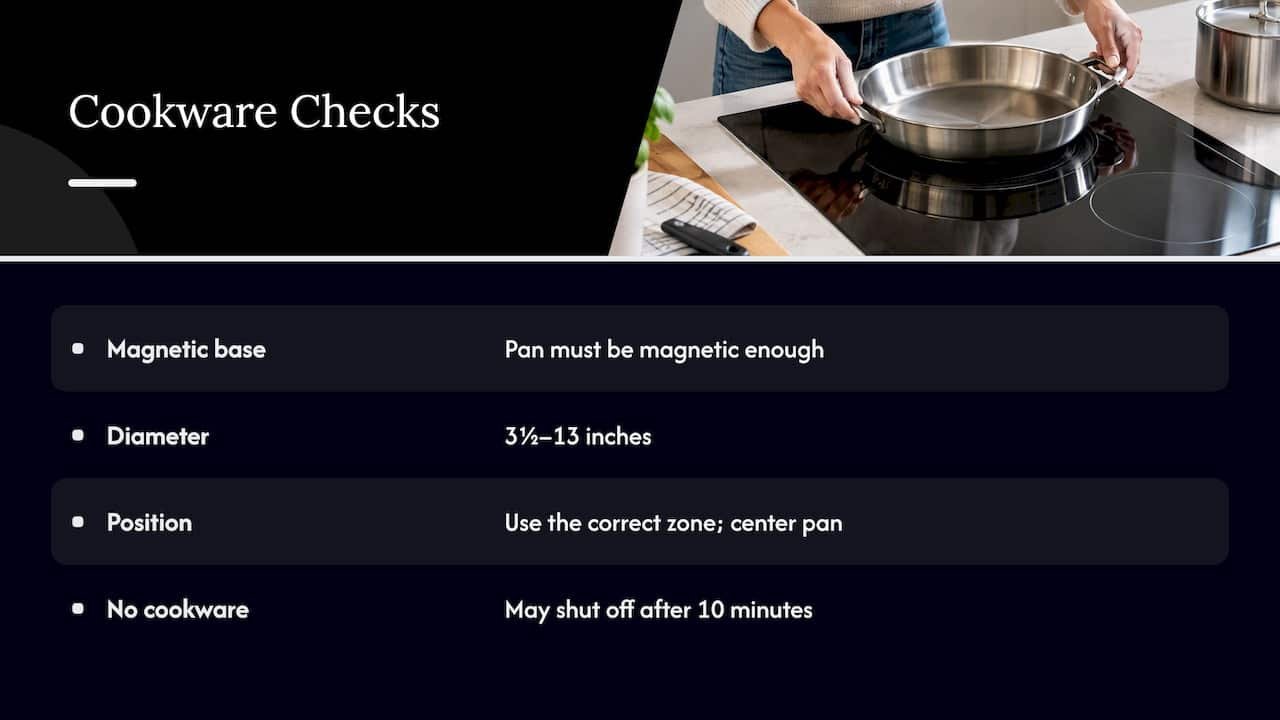
Fisher & Paykel’s U.S. user guide says a flashing heat display generally means the pan is on the wrong zone, is unsuitable for induction, is too small, or is off-center. It also notes that no heating occurs without suitable cookware, and the cooktop may turn itself off after 10 minutes without it.
A quick cookware test
- Magnet test: hold a refrigerator magnet to the bottom of the pan. If it sticks firmly, the pan is likely magnetic enough. If it barely clings or falls off, switch pans.
- Flat base: a warped or rounded bottom loses contact with the glass and can confuse the sensor.
- Size match: use a pan close to the size of the marked zone, and center it.
- Right zone: make sure you turned on the zone the pan is actually sitting on.
Cast iron and most stainless steel with a magnetic base work well. Pure aluminum, copper and glass cookware generally will not, unless they have a magnetic layer built into the base. If a pan that has worked for years suddenly fails, and a different known-good pan heats fine on the same zone, the cookware was the problem. If a known-good pan also fails, move on to the controls.
Flashing lights and unresponsive touch controls
Touch panels are sensitive by design, and that is why they cause so many service calls that are not really repairs.
GE Appliances’ care and cleaning guide, which covers Whirlpool-family cooktops as well, states that flashing lights on the control panel can mean one or more keys are being read as permanently pressed because of dirt, debris or moisture. The fix it describes is to clean the panel thoroughly and make sure nothing is resting on the touch interface.
Miele USA lists several other reasons an induction cooktop may stop responding: a tripped fuse or breaker, an activated system or safety lock, wipe protection, dirty controls, covered fingertips, or touching the display while holding cookware. JennAir similarly points to a locked cooktop, incorrectly pressed keys, poor ventilation or an unintentionally touched power key as reasons the unit will not operate normally.
What to do, in order
- Remove everything from the glass, including pans, towels, a pot lid resting near the controls, and spice jars.
- Wipe the control area with a soft, slightly damp cloth, then dry it fully. Spilled water, boil-overs and grease film are the usual culprits.
- Check the lock. Most models have a control lock or child lock, often a key icon you hold for a few seconds. Look in your manual for how to release it.
- Check wipe protection. Some cooktops briefly disable the controls so you can clean. If yours has one, switch it off or wait for it to end.
- Let the cooktop cool and ventilate. JennAir lists poor ventilation among the causes, so make sure the vents are not blocked and the unit is not overheated.
- Reset the power (next section).
How to reset an induction cooktop
There is no universal reset button, but the approach is consistent across brands: remove power briefly and restore it. Miele advises releasing any lock and cleaning the display first, then, if there is a technical fault, disconnecting the cooktop from power for about one minute. JennAir’s procedure is to switch the circuit breaker off for one minute and back on. Sub-Zero, Wolf and Cove recommend resetting power at the electrical supply for 10 seconds and trying again.
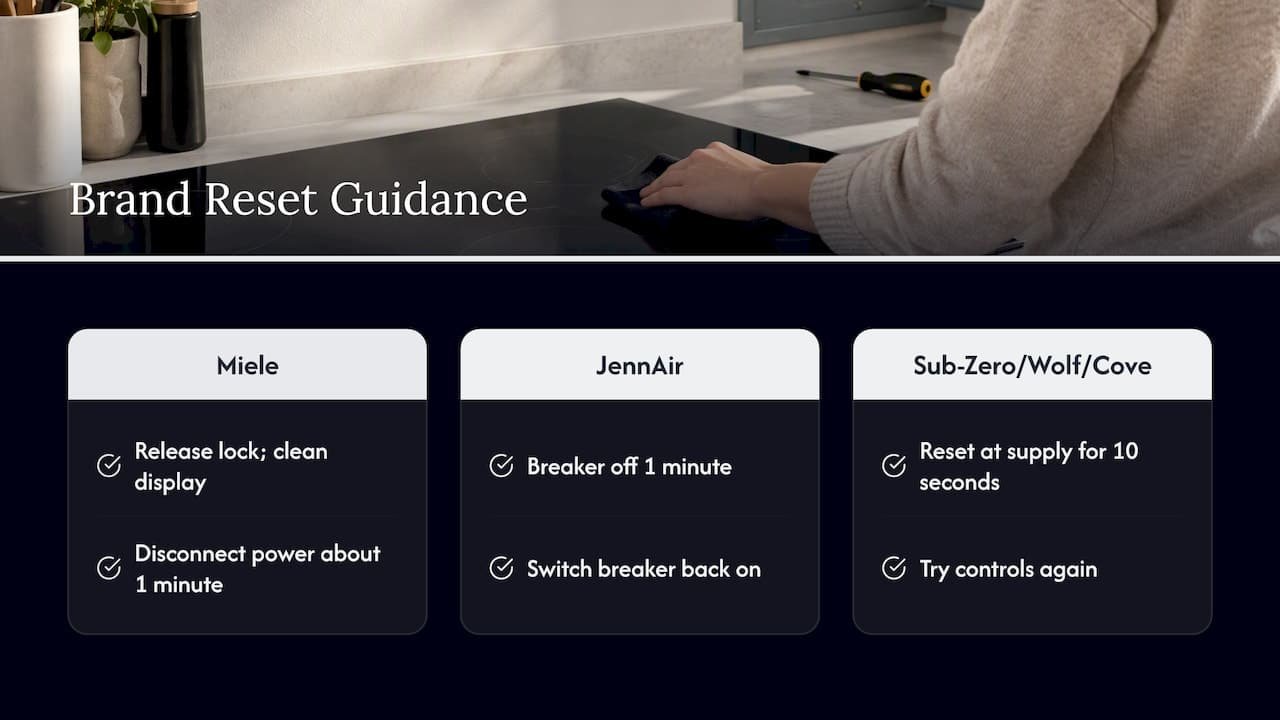
In practice, switch the dedicated breaker off, wait a full minute to be safe, switch it back on, and try the controls. That satisfies every one of the procedures above. Do not open the cooktop or touch wiring to “reset” it. The breaker is the reset point for a homeowner.
The same Sub-Zero and Wolf page identifies power-supply, installation, wiring, control-board and generator issues, as well as a wrong pan size, as possible causes of blinking or nonresponsive controls. That list is a useful reminder: if the simple checks do not help, the cause may sit behind the glass or in the wiring, which is a job for a technician, not a DIY repair.
Reading error codes
If the display shows an “F” followed by a number, or another code, the cooktop is telling you it has detected a specific condition. Thermador’s support page for its induction line says error codes may indicate incorrect supply voltage, overheating, or an appliance that is not connected properly, and it directs owners to customer support if a code is not listed.
A few practical steps:
- Write down the code exactly as shown, and take a photo of the display.
- Find the model and serial number. They are usually on a label under the cooktop or in the manual.
- Look up the code in your manual. Codes are brand-specific, so a code from one maker does not translate to another.
- Try one power reset. Some codes clear after a reset, particularly overheating codes once the unit has cooled. A code that returns right away is a sign the fault is real.
Technicians use the code, along with the model number, to bring the right parts on the first visit. That is why a clear photo saves time when you book.
Low voltage and weak heating
Sometimes an induction cooktop works, but it feels slow. GE notes that low household voltage may affect heating, and in that case it advises covering the pan with a lid until you reach the desired heat. A lid is a harmless workaround for a one-off, but if weak heating comes with dimming lights, buzzing or a breaker that trips, the supply deserves a professional look.
When to stop and call a professional
Electrical problems are not a place to be brave. The simple checks above are safe for homeowners. The following signs are not.
- A breaker that keeps tripping or a fuse that keeps blowing. The CPSC and ESFI list frequent trips and blown fuses among the signs of electrical problems. If you want to understand why a breaker trips in the first place, this walkthrough on why a circuit breaker keeps tripping covers the common causes.
- A shock, even a mild one, from the cooktop or its surroundings.
- Warm or hot outlets and switches. The CPSC says these may indicate unsafe wiring and advises having a qualified electrician check the wiring.
- Burning smells, scorch marks, cracked glass or visible damage. Switch off the breaker and leave the unit alone.
- Water or flood exposure. The CPSC says electrical safety devices such as breakers and GFCIs that have been submerged must be replaced, and other appliance parts like motors and circuits should be evaluated by a technician.
- An error code that returns after a reset, or controls that stay dead after cleaning and a power cycle.
For wiring in the walls or at the panel, the CPSC and ESFI recommend hiring a licensed electrical inspector or electrician to find and correct hidden hazards. For the cooktop itself, an appliance technician can test the unit and tell you whether the problem is in the appliance or in the supply.
Our perspective
Most of the induction calls we hear about start the same way: the cooktop worked last week, and now it is dark or flashing. Many of those can be solved with the checks in this guide, and we are glad when a homeowner can get dinner on the table without a visit.
The harder calls are the ones where the quick checks have been done and the problem remains. A control board, a failed sensor or a supply problem is not something to improvise around, and a repair attempted without the right training can create a bigger problem, including trouble with a manufacturer’s warranty. Our approach is to diagnose first, explain what we find in plain language, and quote the work upfront before we begin.
We serve homeowners, landlords and property managers across Orange County and Los Angeles County, and we know that a dead cooktop affects the whole household’s routine. That is why we focus on responsive scheduling, licensed technicians and repairs meant to last. If a breaker is tripping or you smell something burning, do not wait for a convenient time: switch the breaker off and call.
MDTECH
Get your cooktop looked at in Orange County or Los Angeles County
If the checks above did not bring your cooktop back, or you spotted one of the warning signs, we can help. MDTech Services repairs and installs major household appliances for homeowners and property managers in Orange County and Los Angeles County, and you can book online. Our appliance repair services cover kitchen appliances, and our page on cooktop repair outlines the common issues we see and how we approach them.
When you book, have these ready: the brand and model number, the error code or a photo of the display, what you already tried, and whether the breaker has tripped. That lets us plan the visit properly. If you are weighing a new cooktop and want it installed safely, see our appliance installation services. You can also start from our home page to see everything we handle, from kitchen appliances to HVAC and plumbing.
Preventing the next breakdown
A few habits keep induction cooktops out of trouble:
- Wipe spills right away. Moisture and residue on the control area are a leading reason for flashing lights.
- Use flat-bottomed, magnetic cookware that fits the zone.
- Keep the vents clear and let the cooktop cool before cleaning.
- Do not stack items on the glass, especially near the touch controls.
- Do not ignore small signs, such as occasional breaker trips, flickering lights in the kitchen or a cooktop that sometimes needs a second try to start.
- Keep the manual or a photo of the label with your model number somewhere you can find it.
Landlords and property managers can add one more habit: tell tenants which breaker serves the cooktop and ask them to report a tripped breaker or a burning smell right away instead of resetting it repeatedly.
FAQ
Why is my induction cooktop not turning on?
Start with power. Check that the unit is plugged in or its main switch is on, that the household breaker or fuse has not tripped, and that there is no power outage. If the power is fine and the controls stay dead after cleaning the panel and releasing any lock, a technician should check the unit.
How do I reset an induction cooktop?
Release any safety lock, clean and dry the touch display, then switch off the cooktop’s circuit breaker for about one minute and turn it back on. Manufacturers describe resets that range from 10 seconds to one minute, so a full minute covers them. Do not open the unit yourself.
Why does my induction burner flash and not heat?
A flashing display usually means the cooktop does not detect suitable cookware. The pan may be non-magnetic, too small, warped or off-center, or you may have turned on a different zone. Try a magnetic pan that fits the zone and is centered. If a known-good pan still flashes, the display may be showing a control or power fault.
When should I call a technician for my induction cooktop?
Call when a breaker trips repeatedly, you feel a shock, outlets feel warm, you smell burning, or an error code comes back after a reset. Also call if the controls stay unresponsive after cleaning and a power cycle. Switch off the breaker while you wait.
Sources
- Troubleshooting | Induction Cooktops Support, Thermador
- Error Codes | Induction Cooktops Support, Thermador
- Panasonic: Troubleshooting, the induction cooktop cannot be switched on
- LG Range: Troubleshooting induction cookware not heating
- Fisher & Paykel induction cooktop user guide
- GE Appliances: Using the cooktop, care and cleaning
- Miele: The induction cooktop no longer responds
- JennAir: Not operating correctly, induction cooktop
- Sub-Zero, Wolf and Cove: Control panel blinking or nonresponsive
- GE Appliances: induction cooktop owner’s manual
- CPSC and NESF: Plug into electrical safety
- CPSC and ESFI: Inspect and Protect campaign
- CPSC: Warning to flood victims
- Why your circuit breaker keeps tripping